Teal resume builder review: Midlife job hunting doesn’t need motivation—it needs a repeatable system. One that keeps you from rewriting your resume from scratch every time you apply.
Teal combines a resume builder and job tracker to help you tailor faster, stay organized, and apply without melting down.
Here’s what you’ll get in this Teal resume builder review:
- The best features (the stuff that actually saves time)
- The drawbacks (so you don’t waste money)
- Who should upgrade vs stay free
- How to use AI without turning your resume into corporate oatmeal
The Lowdown:
Use Teal if: you’re applying to multiple roles and need an organized workflow (resume versions + job tracking + quick tailoring).
Don’t pay yet if: you’re only applying to 3–5 roles total or you already have a tight resume and just need light edits.
Best move: start free, build 1 strong “master resume,” then tailor only for your top roles.
Teal Resume Builder Review: Quick verdict
Teal is worth it for most serious job seekers because it combines:
- Resume building
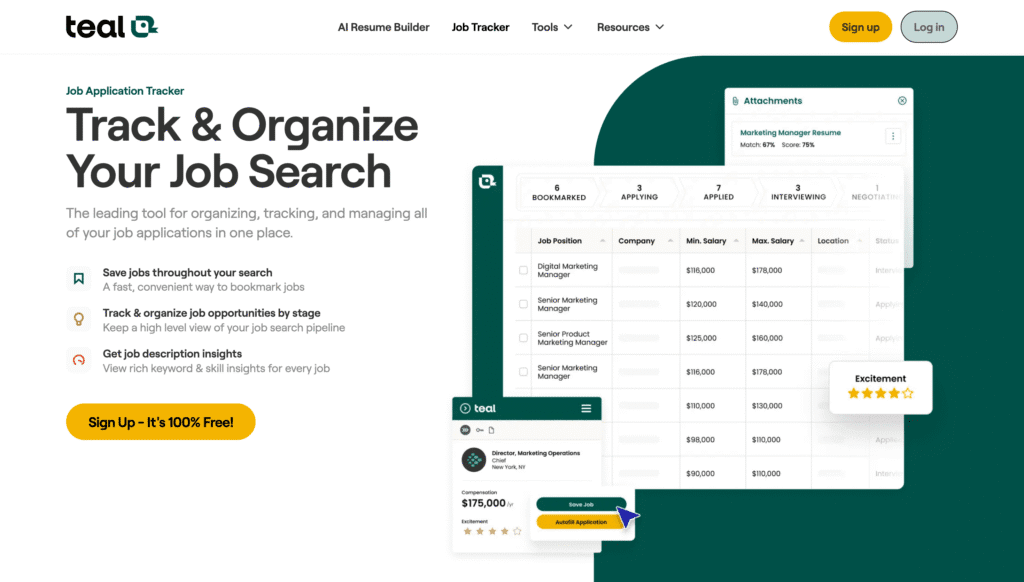
- Job tracking
- “Match” / tailoring workflow
…in one place, which is the real benefit.
If you’re over 40 and you’re feeling behind, that “one place” matters. Less chaos = more follow-through. (If you’re in the middle of a layoff spiral, start here first: Laid Off After 50: The Calm Plan.)
Who Teal is for (and who it isn’t)
Teal is for you if…
- You’re applying to 10+ roles
- You’re pivoting industries and need multiple resume angles
- You want a clear process instead of vibes
- You’re tired of losing track of what you sent where
Teal is not for you if…
- You’re applying to one dream job and doing a fully custom pitch
- You refuse to use a tracker (then you won’t use Teal’s best feature)
- You want a “one-click job offer” tool (doesn’t exist)
What Teal actually does (plain English)
Teal is three tools stitched together:
1) Resume builder
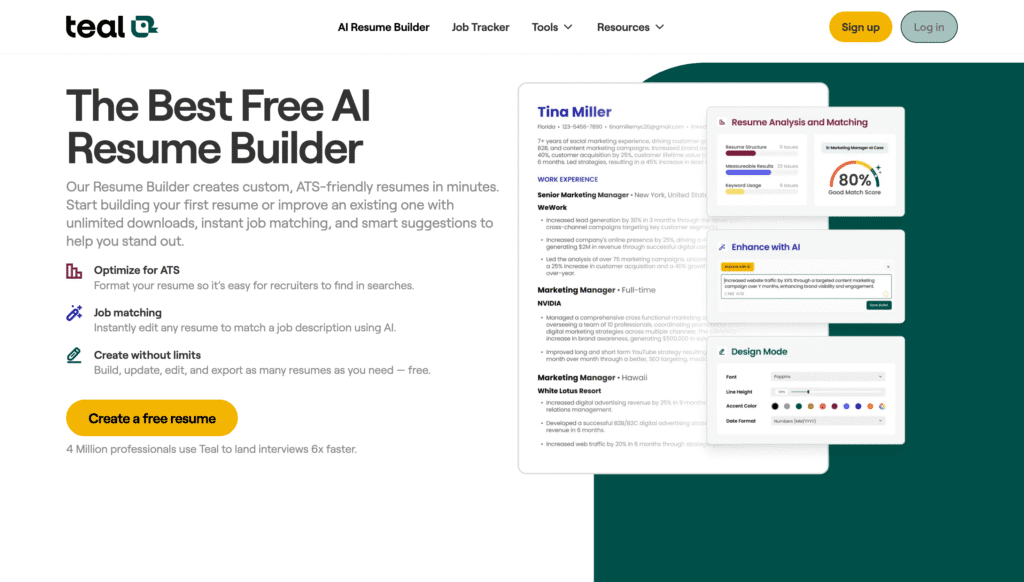
Create an ATS-friendly resume, then duplicate versions for different roles.
2) Job tracker
Track where you applied, what you sent, who you spoke to, and what happens next. (This alone saves people.)
3) Tailoring / matching workflow
Paste a job description and Teal helps you compare it to your resume so you can adjust what matters.
The honest downside (and how to avoid it)
1) AI can make you sound generic
Career researchers have warned that AI-written resumes often come out bland and overly generic. Use AI to edit and sharpen, not invent.
Rule: AI can tighten your bullet points. It should not write your identity.
2) Paid features aren’t required for everyone
Teal has a free tier and a paid tier (“Teal+”). Pricing can be weekly/monthly depending on the plan you choose.
If you’re low on cash, you can still get meaningful value from the free version.
Pricing (simple guidance)
Teal offers free access to core tools, and Teal+ unlocks more advanced features.
Pay for Teal+ only if:
- You’re applying aggressively (high volume)
- You need faster tailoring and advanced features
- You’re treating your job hunt like a project (not a wish)
If you’re applying lightly, don’t pay yet.
How to use Teal in 30 minutes (the “men.fyi” way)
- Create a Master Resume (everything you’ve done, no shame, no trimming yet)
- Pick 2 target role types (example: “Content Strategy Lead” and “Operations / Program Lead”)
- Make one resume version per target role
- For each job you really want:
- paste job description
- tailor 5–8 bullets max (don’t rewrite everything)
- Track your applications and follow-ups in the job tracker
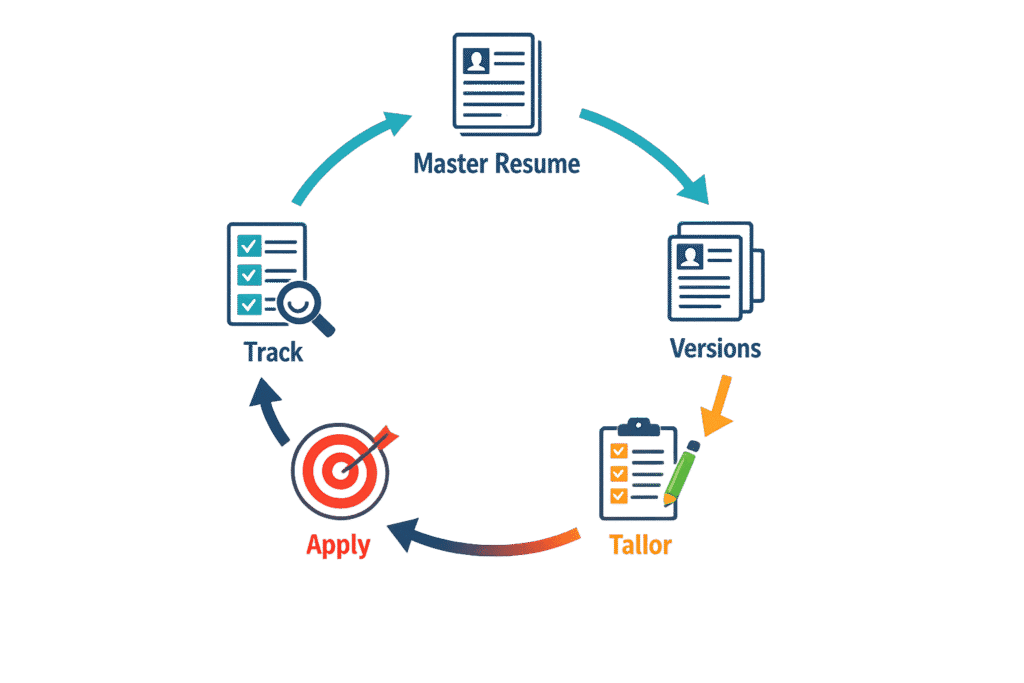
That’s it. It’s not magic. It’s a repeatable loop.
Teal Resume Builder Review: Teal vs Jobscan (quick comparison)
If you’re wondering whether to use Teal or Jobscan:
- Teal: broader job search system (resume + tracking + matching workflow)
- Jobscan: more ATS-scanning focused, but pricing is meaningfully higher (commonly shown around $49.95/mo).
| Feature | Teal | Jobscan |
|---|---|---|
| Best for | Job search workflow + organization (versions + tracking + tailoring) | ATS-focused optimization (resume vs job description scoring) |
| Core value | Keeps your search sane: master resume → versions → tailor → track | Helps you match keywords/structure for ATS-heavy systems |
| Job tracking | ✅ Built-in tracker (key strength) | ⚠️ Limited / not the core focus |
| Resume tailoring | ✅ Practical tailoring guidance + workflow | ✅ Deep keyword matching + scanning emphasis |
| Learning curve | Low–medium (easy to start) | Medium (more “tuning” and iteration) |
| Best use case | Applying to many roles and need momentum + structure | Applying to highly ATS-gated corporate roles and want maximum match |
| Risk | Can still produce generic wording if you over-rely on AI | Can push you into “keyword stuffing” behavior if you chase score |
| Price approach | Start free, upgrade if you’re applying heavily | Typically paid for meaningful usage (often pricier) |
| My recommendation | Start here for 90% of people | Add later if you’re losing out in ATS filters |
Practical take: Start with Teal. Use Jobscan only if you’re applying to a lot of ATS-heavy corporate roles and you need deep scanning.
Best alternatives (if Teal isn’t your thing)
- Google Interview Warmup (free interview practice tool)
- Jobscan (ATS scanning, pricier)
Teal Resume Builder Review: Final verdict
Final verdict on our Teal Resume Builder Review: Teal is a system, not a magic trick
If you’re over 40 and job hunting feels like a never-ending loop of rewrites, second-guessing, and “did I apply to this already?”, Teal is worth trying—because it turns the whole thing into a repeatable process.
It won’t land you a job by itself. What it will do is stop you from spinning:
Master resume → versions → quick tailoring → apply → track → follow up.
That’s the game. Teal just makes it harder to fall off the treadmill.
My recommendation: start with the free version tonight, build one strong master resume, and tailor only for roles you actually want. If you’re applying heavily and the time savings is real, then consider upgrading.
(And if you need the bigger reset (mindset + money + next steps), read our Laid Off After 50 guide next.)
Want the shortcut?
If you want my simple “Midlife Resume Reset” checklist (the exact bullets to tighten, what to delete immediately, and how to tailor without sounding fake), grab it here:
PDF • 2 pages • 10-minute reset
Disclosure: This post may contain links to tools mentioned. If you buy through them in the future, I may earn a commission at no extra cost to you.
🧰 The Fix Kit: Stuff That Actually Helps You Sleep
All tested, no fluff. We only link what actually works.
- 🕶️ Felix Gray Blue-Light Glasses — because scrolling in bed isn’t going away.
- 🧊 Eight Sleep Pod Cover — your half of the bed deserves A/C too.
- 💊 Magnesium Glycinate (Beam Dream / Thorne) — like a nightcap that won’t text your ex.
- 🎧 Hatch Restore 2 — gentle light + sound that doesn’t hate you.